

SQL Server database helps organizations and individuals in keeping their business up and running. It stores sensitive information that the users can extract through suitable SQL queries. To ensure that the queries fetch exact results, proper maintenance, and management of the database is crucial. This requires you to perform various crucial tasks, such as:
- Maintaining data integrity
- Optimizing T-SQL queries and indexing strategies
- Regular monitoring of database performance
Despite all these efforts, some unexpected occurrences, like sudden system shutdown, malware attacks, disk space issues, etc., can halt the working of the database. As a result, you get several database errors, like Recovery Pending state, Suspected, or Dirty Shutdown state.
Admins use different ways to fix these issues and resume the flawless working of the database. This blog discusses a crucial solution to these errors, which is to repair SQL databases using the DBCC CHECKDB command. In addition, it will also briefly discuss the role of an automated SQL recovery tool as an alternative.
What is DBCC in SQL Server?
In the Transact-SQL programming language, Database Console Commands (DBCC) help to perform SQL operations belonging to distinct categories.
- Maintenance: Queries related to the maintenance of the filegroup, index, or database
- Informational: Tasks that accumulate and show different types of database information
- Validation: Operations to allocate database pages or the queries performed on a database, table, index, filegroup, or catalog
- Miscellaneous: Includes tasks like eliminating a DLL file from memory or enabling trace flags
What are the different DBCC Commands?
The DBCC command options mentioned here work on an internal read-only database snapshot created by the Database Engine. The snapshot avoids concurrency and blocking issues that may arise during the execution of these commands:
- DBCC CHECKFILEGROUP: Checks all the tables and indexed views in a selected filegroup of an existing database for structural and allocation integrity.
- DBCC CHECKALLOC: Checks the database consistency of the structures used for disk space allocation.
- DBCC CHECKTABLE: Checks the SQL database for the integrity of structures and pages that comprise the indexed view or table.
- DBCC CHECKCATALOG: Checks an online database for catalog consistency. However, it does not check FILESTREAM data.
- DBCC CHECKDB: Checks a specified database for physical and logical integrity by running:
- DBCC CHECKALLOC and DBCC CHECKCATALOG on the database
- DBCC CHECKTABLE on every table and view in the database
After this brief introduction, let’s now move to know about the DBCC CHECKDB command in detail.
DBCC CHECKDB – A brief intro
The DBCC CHECKDB command works on databases that consist of memory-optimized tables, but the validation occurs only on disk-based tables. Alongside SQL Server, this command also works with Azure SQL Database and Azure SQL Managed Instance. Here are some of its functions:
- Checks every indexed view in the database and validates its contents
- Checks table metadata, system directories, and files to validate link-level consistency between them while storing varbinary data in the file system
- Checks and validates the Service Broker data in the SQL Server database
The command works effectively in repairing the databases, but it takes considerable time to execute the query, especially in the case of large databases. The basic syntax to use it is as follows:
DBCC CHECKDB (‘Your Database Name’)
For example, the T-SQL command DBCC CHECKDB(‘IPL2026’) will check the database named IPL 2026 for the following:
- Logical and physical consistency
- System tables
- Allocation structures
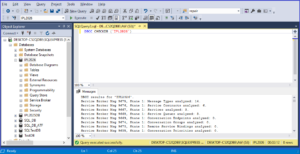
Your screen will look like the image above when running this command on your system. We will consider this very database (IPL 2026) for all the T-SQL queries henceforth.
Options used with DBCC CHECKDB to repair the SQL database
It is better to check your database almost daily or at least at regular intervals to avert the possibility of corruption. The quicker you detect the error, the lesser are the chances of any damage to your database. If, despite stringent measures, your database falls prey to corruption, you can always repair it.
Using options like REPAIR_FAST, REPAIR_REBUILD, and REPAIR_ALLOW_DATA_LOSS with DBCC CHECKDB to repair the SQL database could help in this regard. Notably, the DBCC CHECKDB command is extremely effective in cases where you do not have a backup of your database. Besides, you may also use an SQL recovery tool for this purpose.
Before carrying out this repair, make sure to create physical copies of the following:
- Primary data file (.mdf)
- Secondary data files (.ndf)
- All transaction log files (.ldf)
- Other database containers, including file stream folders, full-text catalogs, or memory-optimized data
How to perform the repair using DBCC CHECKDB options
Before performing the database repair using the DBCC CHECKDB command, make sure to set the database from online to EMERGENCY mode and change its Restriction Access to SINGLE_USER. This will ensure that only you are using the database during the repair without interference from any other concurrent user. Once you complete the repair work, bring the database back to online mode and the Restriction Access to MUTIL_USER.
Here are the commands:
ALTERDATABASE IPL2026 SETEMERGENCY; // Sets your database to EMERGENCY mode
ALTERDATABASE IPL2026 SETSINGLE_USERWITHROLLBACKIMMEDIATE; // Sets your database to SINGLE_USER and terminates all the other connections. If required, this query will also force a rollback.
Various manual repair options that you can use with the DBCC CHECKDB command are as follows:
REPAIR FAST: Actually, it is not a database repair option but provides only backward compatibility.
DBCC CHECKDB(‘IPL2026’, REPAIR_FAST);
REPAIR_REBUILD: It performs repairs that do not run the risk of data loss. These may include:
- Quick repairs, like repairing missing rows in non-clustered indexes.
- Time-consuming repairs, like index rebuilding
DBCC CHECKDB(‘IPL2026’, REPAIR_REBUILD);
REPAIR_ALLOW_DATA_LOSS: Consider it as an emergency last resort if you fail to restore the database from a backup. You can use this DBCC CHECKDB option to deallocate a row, page, or series of pages to clear the errors.
DBCC CHECKDB(‘IPL2026’, REPAIR_ALLOW_DATA_LOSS);
Next, start using the options with DBCC CHECKDB one after another, depending on the level of corruption caused to the database:
After performing these operations with success, do the following:
ALTERDATABASE IPL2026 SETONLINE; //Brings back your database online
ALTERDATABASE IPL2026 SETMULTI_USER; // Sets the database back to MULTI_USER mode.
These repair methods may succeed or even fail at times, and cause considerable data loss. Moreover, they also consume too much time. To avoid these hassles encountered during DBCC CHECKDB repair of the SQL database, admins prefer using an SQL recovery tool.
Repairing SQL databases using SQL Recovery software
An instant benefit of using an automated SQL recovery tool is that it sets you free from the hassles faced during manual methods. You can use these tools to fix several errors, such as:
- ERROR 823/824/825 – Caused by database corruption
- CAN’T REATTACH DATABASE – Caused by improper system shutdown
- ERROR 8946 – Prevents the pages from entering the database backup file
A renowned tool such as Stellar Repair for MS SQL is a befitting one to deal with these issues. It helps
- Recover tables, triggers, keys, and indexes
- Recover deleted database records
- Repair corrupt MDF, NDF and LDF files
Conclusion
An SQL Server database is crucial for the flawless functioning of organizations. It stores important business information for users to extract the details when required. Considering its sensitive role, proper upkeep and regular maintenance of the database is indispensable. However, despite extreme care, your database may face damage or corruption, which can stall the functioning of your business.
This necessitates prompt database repair and recovery of affected data. Admins use DBCC CHECKDB to repair the database in such a situation. Depending on the severity of the corruption or damage, they use several options like REPAIR_FAST, REPAIR_REBUILD, or REPAIR_ALLOW_DATA_LOSS. These manual ways consume too much time and do not confirm the resolution.
Moreover, using REPAIR_ALLOW_DATA_LOSS can lead to considerable data loss as well. To avoid such conditions, admins prefer adopting an SQL recovery tool, such as Stellar Repair for MS SQL or an online SQL Database Repair service. These applications help recover the database quickly, efficiently, and without causing any loss to your confidential data.