
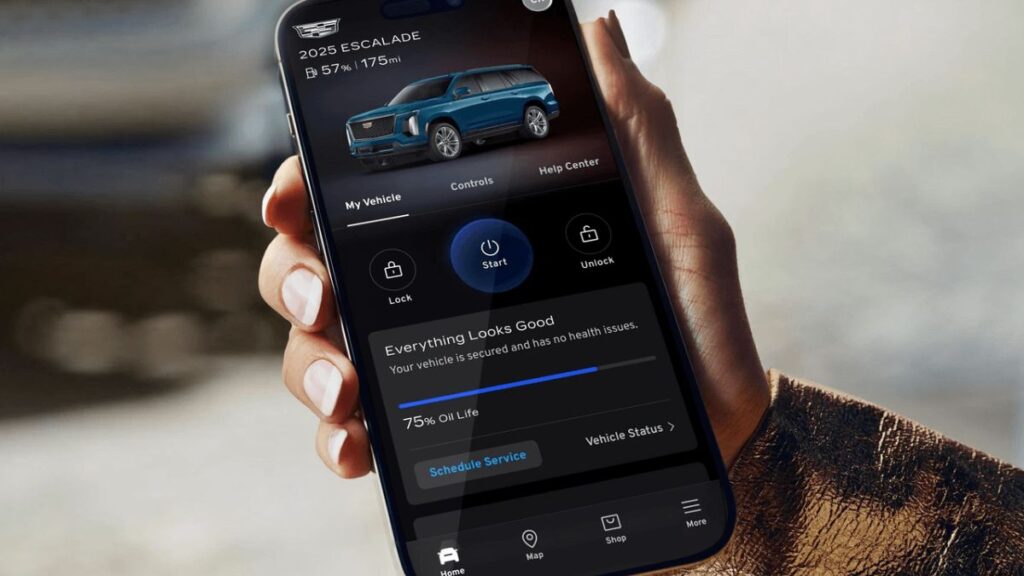
The My Cadillac App has transformed how Cadillac owners interact with their vehicles. Instead of relying solely on traditional keys and dashboard controls, drivers can now access important vehicle information, remote features, maintenance updates, and navigation tools directly from their smartphones.
Whether you recently purchased a Cadillac or are considering using connected vehicle services, understanding how the app works can help you maximize convenience, improve vehicle management, and enhance your ownership experience.
In this guide, you’ll learn about the app’s features, setup process, benefits, troubleshooting methods, and best practices to get the most value from your connected Cadillac experience.
What Is the My Cadillac App?
The My Cadillac App is a mobile application designed to connect Cadillac owners with their vehicles through a smartphone. It serves as a digital control center that provides access to vehicle information, remote commands, maintenance alerts, and connected services.
Drivers can use the app to:
- Remotely start their vehicle
- Lock or unlock doors
- View vehicle status
- Schedule service appointments
- Access roadside assistance
- Monitor fuel or battery levels
- Locate parked vehicles
- Manage connected services
For many owners, the app becomes an essential part of daily vehicle management.
Key Purpose of the App
The primary goal is convenience. Instead of physically being near the vehicle, owners can perform various tasks remotely and receive real-time updates regarding their vehicle’s condition.
Main Features of the My Cadillac App
The app offers numerous features depending on the vehicle model, subscription package, and connected services availability.
Remote Vehicle Controls
One of the most popular features is remote access.
Users can:
- Start the engine remotely
- Lock and unlock doors
- Activate vehicle location tools
- Sound the horn
- Flash vehicle lights
These features are especially useful during extreme weather conditions.
Vehicle Status Monitoring
The app provides important information about vehicle health and performance.
Owners can check:
- Fuel level
- Tire pressure
- Oil life
- Odometer reading
- Battery status
- Vehicle diagnostics
This helps drivers stay informed without needing to sit inside the vehicle.
Navigation Integration
Many Cadillac models allow drivers to send destinations directly from their phones to the vehicle’s navigation system.
Benefits include:
- Faster trip planning
- Real-time destination sharing
- Reduced manual data entry
- Improved travel convenience
Maintenance and Service Alerts
The app notifies owners when maintenance may be required.
Common notifications include:
- Oil changes
- Tire service
- Brake inspections
- Software updates
- Scheduled maintenance reminders
These alerts help extend vehicle lifespan and improve reliability.
My Cadillac App Features at a Glance
| Feature Category | Primary Function | Driver Benefit |
|---|---|---|
| Remote Start | Start vehicle remotely | Improved comfort |
| Door Controls | Lock and unlock vehicle | Added convenience |
| Vehicle Status | Monitor health data | Better maintenance |
| Navigation | Send destinations | Easier travel planning |
| Service Alerts | Maintenance reminders | Preventive care |
| Vehicle Locator | Find parked vehicle | Time savings |
How to Set Up the My Cadillac App
Getting started is relatively straightforward.
Step 1: Download the Application
Install the app from your smartphone’s app marketplace.
Make sure you download the official version and keep it updated for the latest features and security improvements.
Step 2: Create an Account
Register using your email address and create secure login credentials.
You may be asked to verify your account through email authentication.
Step 3: Add Your Vehicle
Enter your Vehicle Identification Number (VIN) or follow the guided vehicle connection process.
The app will verify ownership before granting access to vehicle controls.
Step 4: Activate Connected Services
Some features require active connected services subscriptions.
Follow the activation instructions provided during setup.
Step 5: Complete Verification
Certain security measures may require identity verification before remote functions become available.
Once verified, you’ll gain access to supported features.
Benefits of Using the My Cadillac App
Modern drivers increasingly expect seamless connectivity between their vehicles and digital devices.
Greater Convenience
Remote access eliminates many everyday inconveniences.
For example:
- Starting the vehicle before leaving home
- Unlocking doors without physical keys
- Locating the vehicle in crowded parking areas
Improved Vehicle Awareness
Real-time vehicle data helps drivers monitor maintenance needs before problems become serious.
This proactive approach can reduce unexpected repairs.
Enhanced Security
Security-related features provide additional peace of mind.
Users can:
- Verify lock status
- Receive alerts
- Track vehicle location
- Access assistance services
Better Ownership Experience
The app centralizes many ownership-related tasks into a single platform, reducing the need for multiple systems or manual tracking.
Comparing Traditional Vehicle Management vs App-Based Management
| Vehicle Task | Traditional Method | Using My Cadillac App |
|---|---|---|
| Start Vehicle | Physical presence required | Remote access |
| Check Fuel | Enter vehicle | Smartphone view |
| Find Vehicle | Manual search | Vehicle locator |
| Service Tracking | Paper records | Digital reminders |
| Lock Verification | Return to vehicle | App confirmation |
| Assistance Requests | Phone lookup | Integrated access |
Best Features for Different Drivers
Different owners benefit from different app capabilities.
Daily Commuters
Most useful features include:
- Remote start
- Traffic-aware navigation
- Vehicle status monitoring
Families
Families often appreciate:
- Vehicle locator tools
- Maintenance tracking
- Security notifications
Business Professionals
Business users frequently benefit from:
- Trip planning
- Remote controls
- Efficient service scheduling
Electric Vehicle Owners
Cadillac EV owners may use:
- Charging status monitoring
- Battery range information
- Charging schedule management
Common Problems and Troubleshooting
Like any connected technology, occasional issues can occur.
App Not Connecting to Vehicle
Possible causes include:
- Weak internet connection
- Vehicle connectivity issues
- Outdated software
- Account authentication problems
Try restarting both the app and vehicle systems.
Remote Commands Not Working
If remote functions fail:
- Verify connected services status
- Confirm vehicle eligibility
- Check subscription status
- Ensure location services are enabled
Login Problems
Common solutions include:
- Resetting passwords
- Updating the application
- Clearing cache data
- Reinstalling the app
Delayed Vehicle Updates
Sometimes vehicle information may not refresh immediately.
Possible reasons include:
- Cellular coverage limitations
- Server synchronization delays
- Vehicle communication interruptions
Troubleshooting Quick Reference
| Issue | Likely Cause | Recommended Fix |
|---|---|---|
| App Won’t Open | Outdated software | Update app |
| Login Failure | Incorrect credentials | Reset password |
| No Vehicle Data | Connectivity issue | Check network |
| Remote Start Fails | Service inactive | Verify subscription |
| Missing Alerts | Notification settings | Enable alerts |
| Slow Updates | Sync delay | Refresh app |
Best Practices for Using the My Cadillac App
To maximize performance and security, follow these recommendations.
Keep the App Updated
Updates often include:
- Bug fixes
- Security enhancements
- New features
- Improved compatibility
Enable Security Features
Use:
- Strong passwords
- Two-factor authentication when available
- Device security protections
Review Notifications Regularly
Don’t ignore maintenance alerts.
Prompt action helps maintain vehicle performance and reliability.
Monitor Connected Services
Review subscription details periodically to ensure desired features remain active.
Common Mistakes to Avoid
Many users unintentionally limit their experience by making avoidable mistakes.
Ignoring Software Updates
Older versions may cause performance issues or security vulnerabilities.
Disabling Notifications
Important maintenance alerts can be missed.
Forgetting Account Credentials
Keep recovery options current to avoid account access problems.
Skipping Vehicle Verification
Some features remain unavailable until ownership verification is completed.
Pros and Cons of the My Cadillac App
Pros
- Convenient remote vehicle controls
- Real-time vehicle monitoring
- Maintenance reminders
- Enhanced ownership experience
- Integrated navigation tools
- Improved vehicle security
Cons
- Some features require subscriptions
- Connectivity may vary by location
- Certain functions depend on vehicle model compatibility
- Occasional synchronization delays
Future of Connected Cadillac Ownership
Vehicle connectivity continues to evolve rapidly. Future enhancements may include expanded remote diagnostics, deeper smart home integration, advanced predictive maintenance, and more personalized vehicle experiences.
As automotive technology advances, smartphone-based vehicle management will likely become even more central to everyday driving.
Conclusion
The My Cadillac App provides a practical and convenient way for owners to stay connected with their vehicles. From remote start and door controls to maintenance alerts and vehicle monitoring, the app delivers features that improve convenience, security, and overall ownership satisfaction.
Whether you’re a new Cadillac owner or exploring connected vehicle technology for the first time, learning how to properly use the app can help you unlock its full potential. By following best practices, keeping the software updated, and understanding available features, you can enjoy a smoother and more connected driving experience.
Frequently Asked Questions
1. Is the My Cadillac App free?
The app itself is typically free to download, although certain connected vehicle features may require an active subscription.
2. Can I remotely start my Cadillac with the app?
Yes. Many eligible Cadillac models support remote start functionality through the app.
3. Does the app show vehicle maintenance information?
Yes. Owners can view maintenance reminders, vehicle health reports, and diagnostic information.
4. Can I locate my parked Cadillac using the app?
Yes. The vehicle locator feature helps drivers find their vehicle in parking lots and unfamiliar locations.
5. Is the My Cadillac App available for electric vehicles?
Yes. Cadillac EV owners can access additional features such as battery monitoring, charging status, and range information.
/ You May Also Read /
Pinoroduct com: Complete Guide to Understanding the Platform, Features, Benefits, and Safety
Harris Teeter App: Complete Guide to Saving Money, Managing Rewards, and Shopping Smarter